Grok × Robinhood: Build Your AI Trading Agent (Step-by-Step Setup Guide)
Connect Grok to Robinhood's official Trading MCP, test it read-only, lock it down with trade approvals, then run it with 15 copy-paste prompts built on the real tool names.
Educational only, not financial advice. This guide makes no profit promises and recommends no stock, strategy or trade. Trading involves risk, including loss of principal. It's a setup and safety guide.
- 33-page PDF guide (printable, clickable table of contents)
- 15 ready-to-paste prompts + plain-text prompt pack
- Rulebook system prompt, kill switch & 20 troubleshooting fixes
- Markdown edition of the full guide
Secure checkout via Gumroad with instant digital delivery.
Connect Grok to Robinhood, the careful way
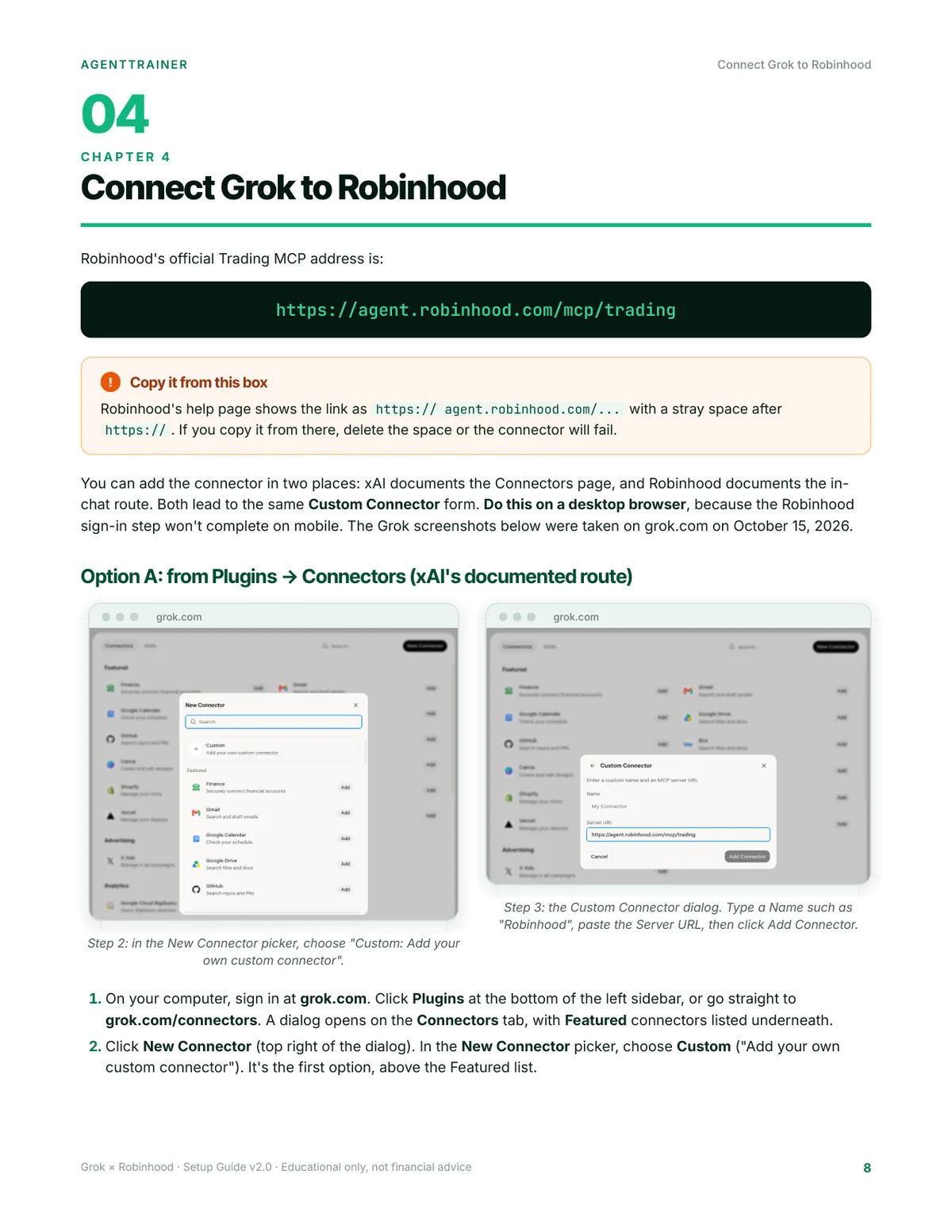
Robinhood now has an official Trading MCP, a supported way to connect AI agents to a dedicated, separately funded Robinhood account. Grok is one of the platforms Robinhood lists, so you can set up a Robinhood AI trading agent from grok.com with no code, no unofficial APIs and no passwords pasted into chat.
The hard part is making it actually useful and making sure it can't trade before you're ready. This guide walks you through it click by click.
- Exactly where to click in Grok to add the Robinhood connector (both documented routes), the one URL you need, and the stray-space gotcha on Robinhood's help page that breaks it.
- A read-only first test: pull your positions, a live quote and a watchlist, then check every number against the app with a pass/fail checklist.
- Trade approvals, switched on. They're off by default for external agents like Grok. See where the toggle is, how to confirm it from Grok, and what to do if your account doesn't have it yet.
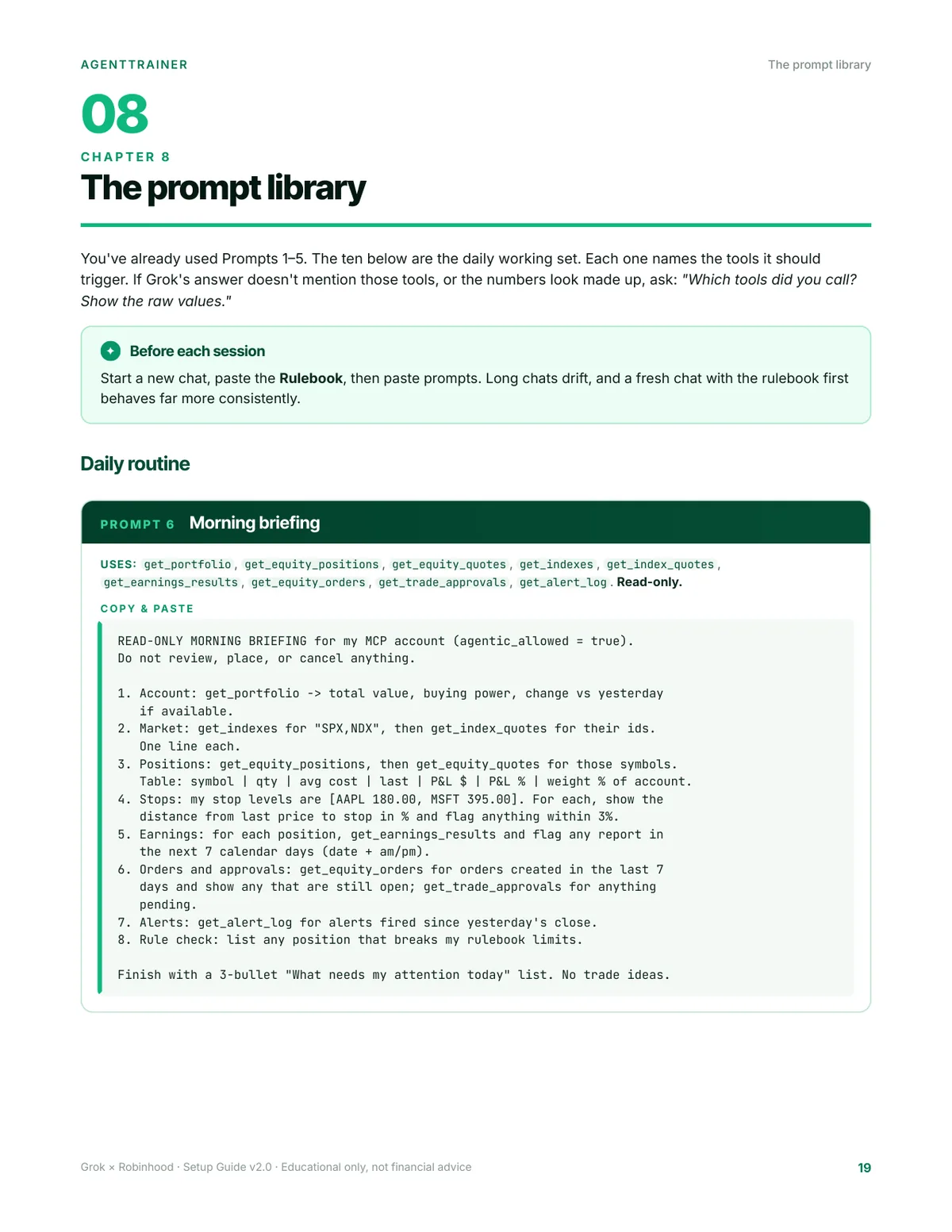
- 15 ready-to-paste prompts written around the real Robinhood tool names (
get_equity_quotes,review_equity_order,create_alert,preview_scanand more), so Grok calls the right tools and shows its work. - A fill-in rulebook system prompt with hard limits: position size, risk per trade, allowed tickers, limit-only entries, regular hours only, a daily stop and an earnings blackout.
- A kill switch: one prompt that cancels every open order and declines every pending approval, plus three more ways to stop, fastest first.
Every fact about Robinhood and Grok was checked against official documentation on October 15, 2026, and the sources are listed in the guide. Where an exact on-screen label couldn't be verified, the guide says so.
Look inside
What's inside
33-page PDF guide (designed, printable, clickable table of contents)
- Real Grok screenshots of every click in the connector setup, plus step-by-step "What you'll see" cards for the Robinhood screens
- What you'll have at the end · How it fits together (what Grok can see vs. trade)
- Prerequisites checklist (account, desktop requirement, options levels, 2026 margin/PDT change)
- Connection walkthrough: Grok → Robinhood Trading MCP → your MCP account
- First safe test (read-only) + verification checklist
- Turning on trade approvals (and fallbacks if you don't have them yet)
- Rulebook system prompt (fill-in limits)
- Prompt library: morning briefing, setup scanner, earnings check, position-size calculator, order review, submit-for-approval, alerts at stops/targets, alert check, weekly P&L review, kill switch
- Optional: scheduling a read-only morning briefing with Grok Automations
- The 4-step kill switch
- Troubleshooting table (20 common errors and fixes)
- Advanced: hard-blocking order tools with Grok Build deny rules
- Risk & disclaimer · Sources
- Bonus: 1-page 7-day launch checklist
Prompt pack (PROMPTS.md): all prompts in plain text for easy copying.
Markdown edition of the full guide (GUIDE.md).
Who it's for
- Robinhood customers who want an AI research-and-trading assistant in Grok, set up carefully
- No coding needed: a Robinhood individual account in good standing, a desktop browser for the one-time sign-in, and a grok.com account
- On Grok Business/Enterprise, your admin has to enable the connector
- Not for: anyone looking for a "get rich" system or guaranteed returns. There isn't one.
FAQ
Does Grok really connect to Robinhood directly?
Yes. Robinhood's own help center lists Grok with setup steps, and xAI documents custom MCP connectors at grok.com/connectors. No code, no unofficial APIs and no passwords pasted into chat.
Will the agent trade my main account?
No. Robinhood only lets external agents trade in a dedicated MCP account that you fund. Be aware, though, that the agent can read all your Robinhood accounts.
Are trade approvals on by default?
No. Trade approvals are off by default for external agents like Grok. The guide shows where the toggle is, how to confirm it from Grok, and what to do if your account doesn't have it yet.
Do I need to know how to code?
No. You need a Robinhood individual account in good standing, a desktop browser for the one-time sign-in, and a grok.com account. On Grok Business/Enterprise, your admin has to enable the connector.
Is this a trading strategy?
No. It's a setup and safety guide. It doesn't recommend any stock, strategy or trade, and it makes no profit claims.
What format is it?
A 33-page designed, printable PDF with a clickable table of contents, a plain-text prompt pack (PROMPTS.md), and a Markdown edition of the full guide, delivered instantly via Gumroad.
Disclaimer: Educational content only. Not financial, investment, legal or tax advice. Trading involves substantial risk of loss, including your entire investment, and AI agents make mistakes. No results or profits are promised or implied. AgentTrainer isn't affiliated with, endorsed by or sponsored by Robinhood or xAI. Robinhood and Grok are trademarks of their respective owners.